How can I make FashionGen asset packs for Character Creator appear in FashionGen (e.g. Fabric 100 or the FashionGen Free Resource) ?

Menu

Search


How can I make FashionGen asset packs for Character Creator appear in FashionGen (e.g. Fabric 100 or the FashionGen Free Resource) ?

Reallusion Support
FashionGen

Follow the steps below to move FashionGen content into the default installation path so that FashionGen can detect it.

1. Open CC Content Manager and locate the pack under “Template > Stage > Texture > FashionGen”.
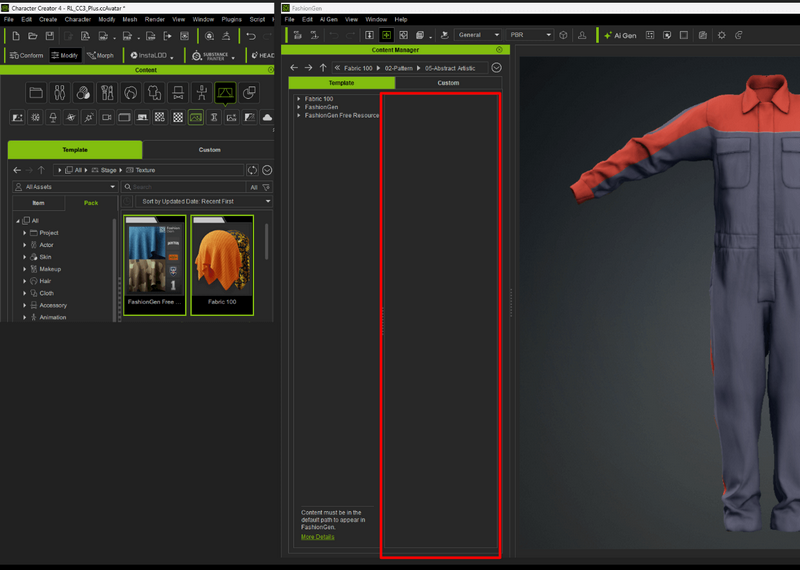
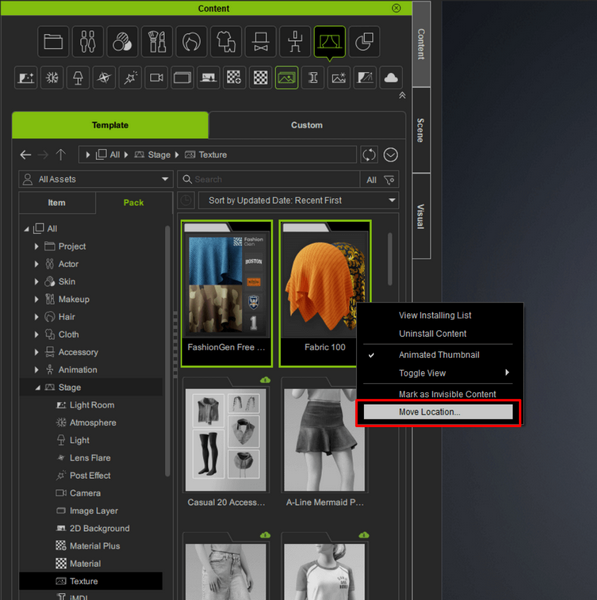
2. Select the pack, right-click it, and choose “Move Location”.
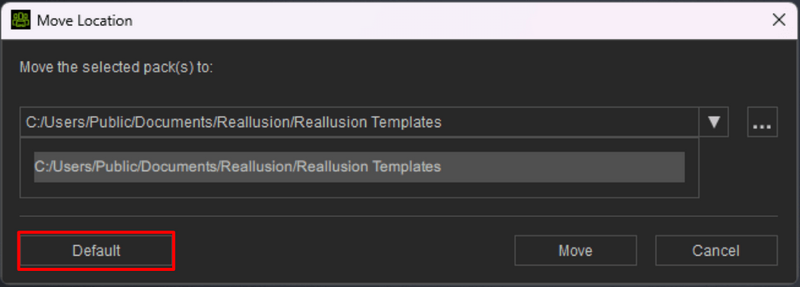
3. In the pop-up dialog, click the Default button to reset the content path.
4. Once completed, check to ensure that the content is available in the FashionGen Content Manager.


Also In This Category


Details
Last Modified: 12/22/2025 7:27:23 AM
Last Modified By: Reallusion Support
Type: FAQ
Article has been viewed 761 times.
Options
Customer Support Software By InstantKB 2015-2
Execution: 0.000. 8 queries. Compression Disabled.